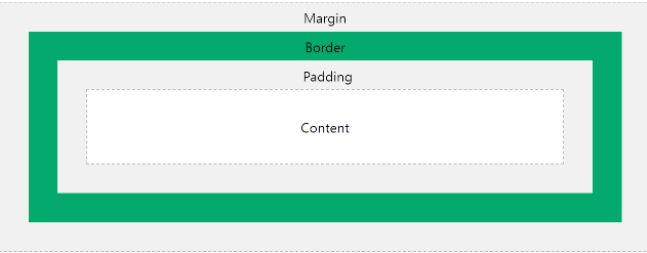
CSS는 기본적으로 Content, Padding, Border, Margin이라는 HTML 요소를 감싸는 box가 존재합니다.
CSS display 속성 :
- inline
- block
- inline-block
inline : 전후 줄바꿈 없이 한 줄에 다른 엘리먼트들과 나란히 배치된다.(width, height 속성은 무시된다, margin, padding은 반영됨) ex. <span>
block : 전후 줄바꿈이 들어가 다른 엘리먼트들을 다른 줄로 밀어내고 혼자 한 줄을 차지한다.(width, height, margin, padding 모두 반영됨) ex. <div>
inline-block : 기본적으로 inline 처럼 엘리먼트들이 나란히 배치가 되는데 inline에서 불가능하던 width와 height 속성및 margin과 padding속성을 지정할 수 있다.
inline이 나오다가 block이 나오면 inline 요소에서 띄우고 다음줄에서 block이 나온다.
float는 공중에 뜨는 속성
<div style="width: 500px">
        <div style="height:50px; background: red"></div>
        <div style="width:200px; height:150px; float:left; background:rgba(0,255,0,0.5)"></div>
        HELLO
        <div style="height:50px; background: skyblue">WORLD</div>
        !!
</div>
Q : 위 예제에서 float는 공중에 뜨는 속성이라고 했는데 why??초록색 안에 들어가서 글씨가 적혀지지 않았나???
A : float는 같은 float와 inline요소의 가드로 작동하기 때문에 float속성이 끝난 초록색 뒤에 글씨가 적혀지는 것이다.(아래에서 3번째 설명)
Float가 생성되면 발생하는 일
- new bfc: 해당 float 요소부터 새로운 bfc가 생성된다.
- float over normal flow: float로 인해 새로 생성된 bfc에 normal flow로 다른 block 요소가 그려질 수 있다. 이 경우 normal flow로 그려진 block 요소 위에 float 요소가 겹쳐서 그림이 그려진다.
- text, inline guard: float로 인해 새로 생성된 bfc 이후에 생성된 inline 요소의 경우 float 요소와 겹쳐서 그려지지 않고 float 요소가 차지하는 영역만큼 밀려서 그려진다.
- line box: float는 새로운 bfc를 생성하지만 bfc 방식으로 위치가 결정되지 않는다. line box 방식으로 위치가 계산된다.
LineBox를 잘 이해할 수 있는 예제 ***중요
<div style="width:500px">
        <div class="left" style="width:200px; height:150px">1</div>
        <div class="right" style="width:50px; height:150px">2</div>
        <div class="right" style="width:50px; height:100px">3</div>
        <div class="left" style="width:150px; height:50px">4</div>
        <div class="right" style="width:150px; height:70px">5</div>
        <div class="left" style="width:150px; height:50px">6</div>
        <div class="left" style="width:150px; height:50px">7</div>
        <div style="height:30px; background:red">ABC</div>
</div>
.left {
float: left;
background-color: green;
}
.right {
float: right;
background-color: yellow;
}위 코드 실행 과정
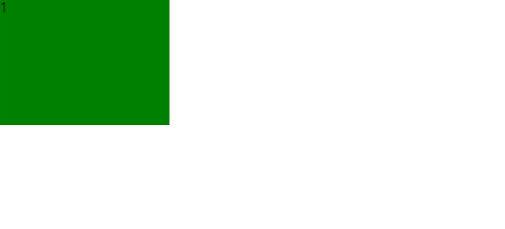

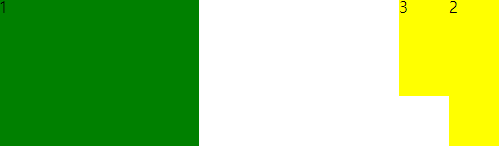
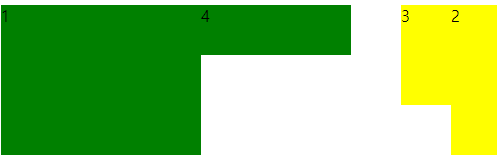
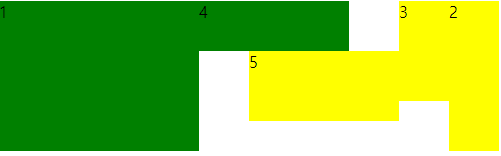
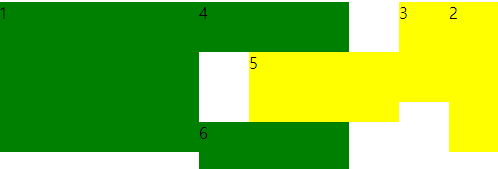

float는 float와 inline요소를 가드하지만 block요소는 가드하지 않는다.
ABC는 float요소가 아니고 block요소 이기 때문에 위 사진과 같은 자리에 위치하는 것이다.
여기서 아래와 같이 마지막줄 코드를 수정한다면
     <div style="width:500px">
        <div class="left" style="width:200px; height:150px">1</div>
        <div class="right" style="width:50px; height:150px">2</div>
        <div class="right" style="width:50px; height:100px">3</div>
        <div class="left" style="width:150px; height:50px">4</div>
        <div class="right" style="width:150px; height:70px">5</div>
        <div class="left" style="width:150px; height:50px">6</div>
        <div class="left" style="width:150px; height:50px">7</div>
        <div style="height:30px; background:red">ABC1 ABC2 ABC3 ABC4 ABC5 ABC6 ABC7 ABC8 ABC9</div>
    </div>
이와 같이 block요소인 ABC들이 float가 linebox인 부분으로 가서 출력이 되고 마지막에 있는 ABC8, 9 와 같은 경우 그 위의 공간은 전부 들어갈 수 없는 공간으로 만들어 졌기 때문에(7번 블록에서 float-left옵션을 주었기 때문에 그보다 왼쪽에 있는 것들은 사용할 수 없는 공간이 된다.) 그림과 같이 그려지게 된다.
***여기서 주의해야할 점은 ABC1부분에 빨간색 박스 영역이 우리가 보이는 것은 조그마한 영역이지만 실제로는 width = 500px인 빨간색 박스라는 것을 인식해야 한다.
OVERFLOW 옵션
VISIBLE(default 값) : 보일 때 까지 커지는 것
HIDDEN : 보이지 않는 곳으로 가면 그 내용은 숨기는 것
SCROLL : 보이지 않는 곳으로 가면 그 내용을 볼 수 있게 scroll을 생성하는 것
		...
        <div class="hidden" style="height:30px; background:red">A</div>
        <div class="hidden" style="height:15px; background:orange">B</div>
        <div style="height:30px; background:black"></div>
        <div class="hidden" style="height:30px; background:red">C</div>
        <div class="hidden" style="height:30px; background:orange">D</div>
        <div style="height:30px; background:black"></div>
        <div class="hidden" style="background:red">E</div>
        <div style="height:30px; background:black"></div>
        <div class="hidden" style="height:30px; background:orange">F</div>
        <div style="height:30px; background:black"></div>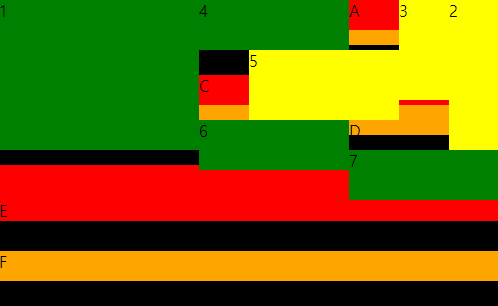
위 사진처럼 hidden옵션을 이용하면 overflow가 발생 했을 때 안보이게 적용할 수 있다.
